Print Screen SysRq Button
When you press it, it takes a snapshot (screen shot)
and you may past it in any drawing application,
For example: Painter or Photoshop by pressing Ctrl+V.
SysRq = It means that this button requires a Windows Operating System to
be functional,
Note: you cannot copy the screen in DOS or BIOS .
Thanks for visiting our site.... for more information connect with us on Facebook...
Thanks
All "Computer Youth"
Wishing you very Happy
EID-ul-Azha Mubarak
May Allah Bless on you ..
Regards: CYP Admin
Shakeel Armaan
Lock Your Computer with Log Off Screen
By Press (Window + L)
First of All you have to create a Password of
your administrator Profile..
Following are the steps:
Go to Start button -- Setting -- Control Panel
Click on User Accounts
Further go a head
There you will see Administrator profile & guest account.
Click on Administrator profile
Create a Password
In both line create your password in sequence and then
Click on Create password button.
Then Click on ... Yes, Make Private
And you have done....
Now you have to active some Screen Saver setting
Follow the steps.
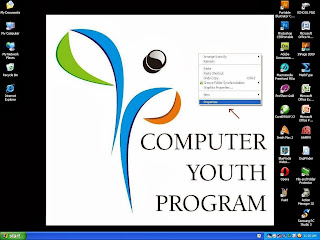
- Right Click of Mouse on desktop and go to PROPERTIES.
- On the Screen Saver tab, under Screen saver, click a screen saver of your choise.
- Select the On resume, password protect check box.
- Then Click O.K and Apply
- If Fast User Switching is turned on, select the On resume, display Welcome screen check box.
After Complete the process....
To Lock your Computer
You can press Window + L
Now you will see log on welcome Screen.
Enter Your Password
Done.......
If you have any problem so contact me at
Regards:
CYP Admin
Shakeel Armaan
ProShow Gold 4
A Video Editing software
Click Here to Download this software
Password is
shakeel.armaan
Create instant shows on your desktop
with unlimited photos, videos & music, plus
easy customization. Share online or on TV.
Regards:
CYP Admin
Shakeel Armaan
How to Recover Hidden Files From Virus Infected USB
Pendrive without any Software
We are using USB pen drives for data transfer between computers.
It's very important to keep your data always with you. When you're using pen
drives,
The biggest problem is Viruses. Mostly pen drives doesn't consist any
security measures. So viruses and malwares can attack our pen drive easily.
If
virus attacks your pen drive, it hides the all the files and creates .exe
extension to replace the hidden files.
Normally you can view hidden files by clicking
Folder Options -->
View -->
Show Hidden Files and Folders
But this simple method doesn't work when your pen
drive is attacked by harmful viruses.
Even it Hide the Hidden Check Box
So here I'll provide you an easiest method to view your
infected files from pen drive without using any software.
Insert pen drive into computer and find drive letter of
connected USB drive
For Example, E:
Now click on Start --> Run
In Run box, type cmd and hit Enter
Now command prompt will appear, in command prompt type
the drive letter of your pen drive and hit Enter.
Example type E:
After that, type attrib -s -h /s /d *.*
Now hit Enter and wait for sometime. That's all, You have
done........!
Now you can view all your files in pen drive without any problems.
CYP Admin
Shakeel Armaan